
Description
Enterasys A2H124-24FX (P0973BJ) – 24‑Port 100BASE‑FX Fiber Access Switch for Secure, No‑Noise Edge Connectivity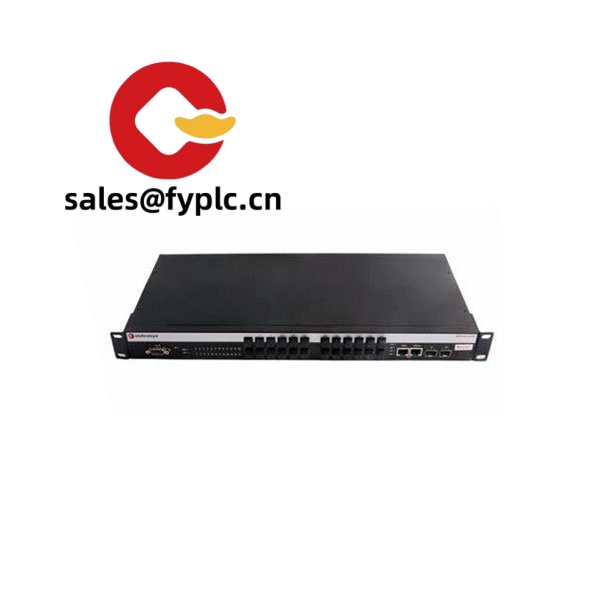
The Enterasys A2H124-24FX (P0973BJ) is a Layer 2 Fast Ethernet fiber switch designed for sites that need reliable fiber-to-the-edge—factory floors, utility corridors, traffic systems, or campus buildings with long cable runs. One thing I appreciate is how the all‑fiber access typically eliminates EMI headaches you’d see with copper in harsh environments. You might notice that it’s also straightforward to manage, so rolling it into an existing Enterasys/Extreme environment tends to be smooth.
Our Order Placement Process and Guarantees
- Warranty: 365 days
- Delivery: 1 week if in stock; no more than 1 month at the latest
- Payment: 50% advance payment; full payment before delivery
- Express options: FedEx, UPS, DHL
Key Features
- 24 × 100BASE‑FX fiber access ports – Stable fiber connectivity for long runs and EMI‑prone areas.
- Layer 2 switching with VLAN and QoS – 802.1Q VLANs, priority queuing; typically handy for segmenting OT/IT traffic.
- Spanning Tree and link aggregation – RSTP/MSTP and 802.3ad LACP in most cases for redundant topologies and higher uplink throughput.
- Managed access – Web/CLI, SNMP; SSH is commonly available on A2 series for secure administration.
- Gigabit uplink options (model family) – A2 series typically provides combo copper/SFP uplinks to aggregate your fiber edge.
- 1U rackmount form factor – Fits standard 19‑inch cabinets; can sit on a shelf if needed.
- Fan‑assisted cooling – Designed for continuous operation; from my experience, it’s stable under typical wiring closet loads.
Technical Specifications
| Brand / Model | Enterasys A2H124-24FX (P0973BJ) |
| Product Type | Layer 2 Fast Ethernet fiber access switch |
| HS Code | 8517.62.00 (Data switching equipment) |
| Power Requirements | 100–240 VAC, 50/60 Hz, internal power supply |
| Dimensions & Weight | 1U, 19‑inch rackmount chassis; depth typically mid‑short (around 250–300 mm); weight generally < 5 kg |
| Operating Temperature | 0 to +40 °C (typical enterprise indoor) |
| Signal I/O Types | 24 × 100BASE‑FX fiber ports; Gigabit uplink options available in the A2 family |
| Communication Interfaces | Ethernet management, SNMP v1/v2c/v3, Web/CLI, Telnet/SSH (where licensed), RJ‑45 console |
| Installation Method | 19‑inch rackmount with brackets or shelf/desktop mounting |
Application Fields
This model is often chosen where fiber is mandatory or strongly preferred:
- Manufacturing cells and process areas with high EMI where copper links are unreliable.
- Campus buildings and arenas that need long‑distance runs between closets on multimode fiber.
- Transportation, CCTV backbones, and traffic cabinets that standardize on fiber for security and noise immunity.
- Utility corridors and substations where grounded metal paths and surge exposure make fiber the safer medium.
A maintenance engineer told us, “We swapped three copper edge switches for one A2H124‑24FX on the plant floor; the fiber runs stopped our random CRC storms and the night shift stopped calling.”
Advantages & Value
- Reliability in harsh spaces – Fiber to the edge typically means fewer link errors and less downtime.
- Compatibility – Plays well with common enterprise standards (802.1Q, RSTP/MSTP, LACP, SNMP); straightforward drop‑in at the access layer.
- Cost control – All‑fiber access in one 1U unit reduces media converters and power points across a row.
- Supportability – Familiar Enterasys software workflow; in many cases, you can reuse existing tooling and templates.
Installation & Maintenance
- Cabinet & airflow – Install in a 19‑inch rack with front‑to‑back ventilation; keep intake/exhaust paths clear.
- Power & grounding – Use a conditioned 100–240 VAC feed. Proper grounding helps minimize transients.
- Fiber handling – Respect bend radius, clean ferrules regularly, and use proper dust caps. A few minutes of cleaning typically saves hours of troubleshooting.
- Wiring & labeling – Document VLANs, trunk groups, and STP roles; it seems basic, but it speeds up incident response.
- Routine care – Back up configs after changes, review logs/SNMP traps, and keep firmware at a vetted release recommended by your standards.
- Safety – Avoid staring into energized fiber ports; disconnect power before moving modules or rack hardware.
Quality & Certifications
- CE, UL/cUL, FCC Class A, and RoHS compliance are typical for this product family.
- Manufacturer policies may vary by region and purchase channel; for this supply, our coverage is a 365‑day warranty.
Recommended Accessories & Supporting Components
- Rack‑mount kit – Standard 19‑inch brackets and fasteners for secure mounting.
- Console cable – RJ‑45 to DB‑9 (or USB adapter) for local CLI access.
- Gigabit SFP uplinks (A2 series) – 1000BASE‑SX for short MMF links; 1000BASE‑LX for long‑reach SMF uplinks, depending on your distribution/core design.
- Fiber patch cords & cleaning kit – Matched connectors and a basic cleaning kit usually prevent most light‑level issues.



Reviews
There are no reviews yet.