
Description
NVIDIA A800 PCIe – Ampere-based data center GPU for AI training, inference, and HPC at PCIe Gen4 speed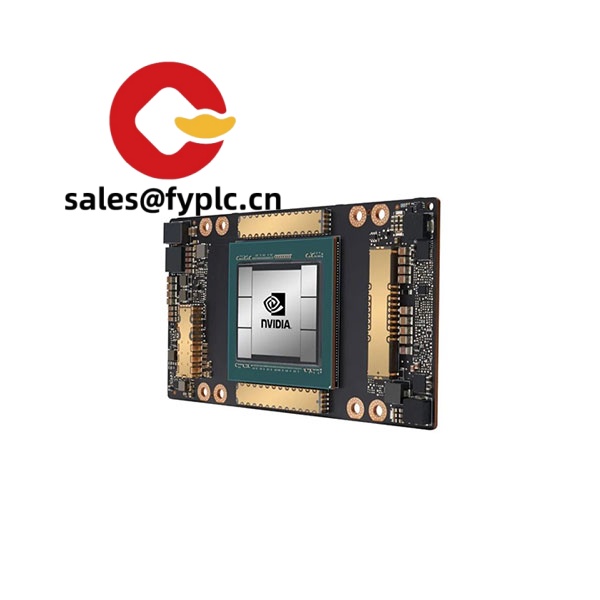
The NVIDIA A800 PCIe is a compute-focused accelerator built on the Ampere GA100 architecture, designed for servers that need strong AI and HPC performance without changing their existing PCIe infrastructure. From my experience, it slots into standard FHFL dual‑slot bays, plays nicely with mainstream x86 and Arm servers, and delivers the mature CUDA software stack most teams already rely on. You might notice that it’s a practical pick when you want predictable performance, MIG-based partitioning for multi-tenant workloads, and stable availability in many regions.
Company’s Order Placement Process and Guarantees
- Warranty: 365 days
- Lead time: In-stock ships in about 1 week; no more than one month at the latest
- Payment: 50% advance payment; full payment before delivery
- Express options: FedEx, UPS, DHL
Key Features
- Ampere GA100 compute engine – Optimized Tensor Cores support TF32, FP16, and BF16 for faster training without code overhauls.
- PCIe Gen4 x16 interface – Drop-in compatibility with mainstream 2U/4U servers; no exotic baseboards required.
- HBM2e with ECC (typically 80 GB) – High-capacity, high-bandwidth memory helps large models and mixed workloads stay on-GPU.
- MIG (Multi‑Instance GPU) up to 7 instances – Partition the GPU for multi-user inference or diverse pipelines in one chassis.
- Data-center form factor – FHFL, dual-slot, passive cooling for front‑to‑back airflow; ideal for dense racks.
- Mature software stack – CUDA, cuDNN, TensorRT, and RAPIDS are widely supported, which typically shortens deployment time.
- Compute-only design – No display outputs; purpose-built for servers and containerized workloads.
Technical Specifications
| Brand / Model | NVIDIA A800 PCIe (Ampere GA100) |
| HS Code | 8473.30 (Parts and accessories for ADP machines) |
| Power Requirements | TDP typically 250–300 W; power via PCIe slot plus auxiliary PCIe power connector(s) |
| Memory | HBM2e with ECC, commonly 80 GB on PCIe variants |
| Interface / Bus | PCIe Gen4 x16 |
| Dimensions & Weight | FHFL, dual-slot; approx. 267 × 111 × 40 mm; passive heatsink |
| Operating Temperature | Typical server inlet 5–35 °C with adequate front‑to‑back airflow |
| Signal I/O Types | Compute-only; no display outputs |
| Communication Interfaces | Host connectivity via PCIe Gen4; management via NVIDIA drivers (nvidia‑smi / NVML) |
| Installation Method | Install into a server’s FHFL dual‑slot PCIe bay; connect required auxiliary power; ensure directed airflow |
Application Fields
Teams typically choose the A800 PCIe for mixed AI clusters, on‑prem inference farms, and HPC workloads where server compatibility and predictable power draw matter. It fits well in:
- Deep learning training/inference for CV, NLP, and recommendation engines (PyTorch, TensorFlow)
- HPC simulation and scientific computing using CUDA and libraries with MIG-based consolidation
- Data analytics acceleration with RAPIDS (ETL, feature engineering, graph analysis)
- Virtualized and containerized environments (Kubernetes + NVIDIA GPU Operator) in 2U/4U servers
Advantages & Value
- Reliability: Passive, server-grade design and a mature driver stack reduce surprises in production.
- Compatibility: Works with mainstream OEM servers and the CUDA ecosystem; easy to standardize across clusters.
- Utilization: MIG lets you carve the GPU into smaller, right‑sized instances to keep utilization high.
- Cost control: In many cases, PCIe cards simplify procurement and spares management versus proprietary baseboards.
- Supportability: Tooling like nvidia‑smi, DCGM, and container runtimes speed up ops and monitoring.
One thing I appreciate is how straightforward migration tends to be—most teams move existing A100/Ampere pipelines over with minimal tuning. Feedback from a recent systems integrator was that “MIG plus PCIe made it easy to serve multiple customers on one chassis without reshuffling the rack.”
Installation & Maintenance
- Server & cabinet: Use a 19-inch rack server (typically 2U/4U) with FHFL dual‑slot clearance and front‑to‑back airflow.
- Power & wiring: Provide the required auxiliary PCIe power lead(s); verify PSU headroom for 250–300 W per card.
- Cooling: Ensure directed airflow across the passive heatsink; keep inlet temperatures within 5–35 °C.
- Software: Install a supported NVIDIA driver/CUDA toolkit; consider MIG partitioning and persistence mode for multi‑tenant nodes.
- Safety: Power down and discharge before handling; follow ESD precautions and manufacturer torque specs.
- Routine maintenance: Quarterly dust inspection/cleaning, driver/firmware updates on a controlled schedule, and continuous monitoring via DCGM/nvidia‑smi.
Quality & Certifications
- CE, FCC, and RoHS compliance; REACH alignment in most cases
- Manufacturing typically under ISO 9001-certified processes
- Manufacturer’s limited warranty policy varies by region and channel; for data center GPUs it is commonly multi‑year—please confirm per lot
- Our coverage: 365‑day warranty as stated above
Note: Specifications can vary slightly by sub‑model and OEM. If you need confirmation on memory capacity, TDP, or power connector count for a specific batch, we can verify against the exact part number before you place the order.



Reviews
There are no reviews yet.