
Description
ABB CM592-DP – PROFIBUS DP Communication Module for AC500 PLC Systems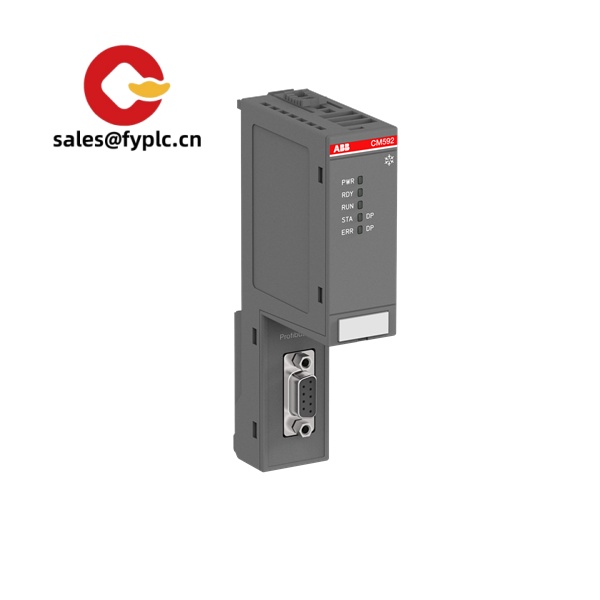
The ABB CM592-DP is a dedicated PROFIBUS DP communication module for the AC500 PLC platform. It’s designed to act as a DP-V0/V1 master or slave, letting your AC500 CPU talk to drives, remote I/O, and third‑party devices on existing PROFIBUS networks. From my experience, it’s a straightforward way to extend an AC500 into brownfield installations where PROFIBUS still runs most field devices—no gateways, no extra rack hardware, just snap it next to the CPU and configure via GSD files.
One thing I appreciate is the balance of simplicity and robustness: you get DP speeds up to 12 Mbit/s, galvanic isolation on the bus, and clear status LEDs that make commissioning less stressful. You might notice that in many cases this module reduces wiring time when integrating legacy ET200 stations or ABB/Siemens drives, because all standard DP profiles are supported.
Our Order Placement Process and Guarantees
- Warranty: 365 days
- Delivery: typically 1 week if in stock; no more than 1 month at the latest
- Payment Terms: 50% advance payment; full payment prior to delivery
- Express Options: FedEx, UPS, DHL
Key Features
- PROFIBUS DP-V0/V1 master or slave – Flexible role selection to fit both new cells and legacy networks.
- Up to 12 Mbit/s – Standard PROFIBUS data rates from 9.6 kbit/s to 12 Mbit/s for long or high‑speed segments.
- GSD-based configuration – Rapid integration of multi-vendor devices using their GSD files.
- Large process image – Suitable for typical DP payloads (commonly up to 244 bytes in/out per device, depending on the device profile and configuration).
- Galvanic isolation – Improved noise immunity and bus protection in industrial environments.
- Compact AC500 form factor – Side-by-side mounting with the CPU on DIN rail; no extra rack or backplane needed.
- Diagnostics LEDs – Quick view of bus status, activity, and errors for faster troubleshooting.
Technical Specifications
| Brand / Model | ABB CM592-DP (AC500 communication module) |
| HS Code | 8538.90.00 (Parts for switching/controlling apparatus – indicative) |
| Power Requirements | Supplied via AC500 backplane; typical consumption ≤ 2.5 W (5 V DC bus). No separate external supply required for the module. |
| Dimensions & Weight | Approx. 131 × 45 × 117 mm (H×W×D); ~0.2–0.25 kg |
| Operating Temperature | Typically −25 °C to +60 °C (cabinet installation, convection-cooled) |
| Signal I/O Types | PROFIBUS DP-V0/V1 fieldbus; common process data up to 244 bytes per device (device-dependent) |
| Communication Interfaces | 1× PROFIBUS port (9‑pin Sub‑D); 9.6 kbit/s to 12 Mbit/s; isolated |
| Installation Method | DIN rail (EN 60715), side‑mounted to AC500 CPU; IP20, inside control cabinet |
| Standards | PROFIBUS per EN 50170; DP profiles; EMC/Low Voltage per CE requirements |
Application Fields
The CM592-DP fits best where AC500 needs to communicate with PROFIBUS devices already on the floor. Typical scenarios include:
- Packaging and bottling lines using existing DP drives and remote I/O (e.g., ET200 stations).
- Water/wastewater plants where legacy PROFIBUS networks remain the backbone for pumps and MCCs.
- Material handling, cranes, and intralogistics with DP frequency inverters and sensors.
- Metals, mining, and cement retrofits that need AC500 performance without changing the fieldbus layer.
A maintenance lead recently told us they swapped a gateway out and put in CM592-DP as master on an older DP ring. “Configuration was mostly GSD import and mapping—cut commissioning time by a day,” was the gist. That matches what we typically see in the field.
Advantages & Value (Procurement Perspective)
- Compatibility – Smooth integration with multi-vendor PROFIBUS devices, reducing gateway costs and spare part complexity.
- Lifecycle confidence – AC500 platform stability and broad install base; easier to standardize across sites.
- Reduced downtime – On-module diagnostics and proven DP stack help shorten troubleshooting windows.
- Scalability – Add one or more CM592-DP modules as your network grows, instead of re-architecting the PLC.
- Total cost – Lower engineering time via GSD configuration and reuse of existing cabling and devices.
Installation & Maintenance
- Cabinet & mounting – Install on DIN rail with the AC500 CPU; allow ventilation gaps; keep within IP20 protected enclosure.
- Wiring – Use PROFIBUS Type‑A shielded twisted pair, 9‑pin Sub‑D connectors, and correct termination at both ends (terminator switch on connectors in most cases).
- Grounding & EMC – Bond shields at the cabinet entry; separate high‑voltage and fieldbus runs to minimize noise.
- Addressing – Set node addresses uniquely; master/slave roles and baud rate are configured in the AC500 engineering tool (e.g., Automation Builder).
- Routine checks – Inspect connectors and terminators, verify shield continuity, back up PLC project and GSDs after changes.
- Firmware & backups – Keep CPU and module firmware aligned with your project version; document GSD revisions of connected devices.
Note: Exact process data sizes and number of connected slaves depend on device types, bus speed, and project configuration.
Quality & Certifications
- CE compliant (EMC/Low Voltage directives)
- cULus listing for control equipment (typically applicable to AC500 modules)
- RoHS and REACH conformant
- Manufacturer warranty support available; our sales warranty: 365 days
Supporting Components (for a complete AC500 setup)
- AC500 CPUs – Examples: PM572 / PM582 / PM595 for different performance classes; select based on cycle time and memory needs.
- S500 I/O modules – Digital (e.g., DI/DO) and analog (AI/AO) modules for local expansion alongside the CM592-DP.
- PROFIBUS accessories – 9‑pin Sub‑D connectors with integrated termination, repeaters for long segments, and Type‑A DP cable.
Quick Quote & Lead Time
We typically ship in-stock CM592-DP units within 1 week via FedEx, UPS, or DHL. For backorders, lead time is capped at one month. Payment terms are 50% in advance and full payment before delivery.
If you’re replacing a failed DP master on an aging line, mention your CPU model and the number of slaves—we’ll validate compatibility and suggest a ready-to-load configuration outline.



Reviews
There are no reviews yet.