
Description
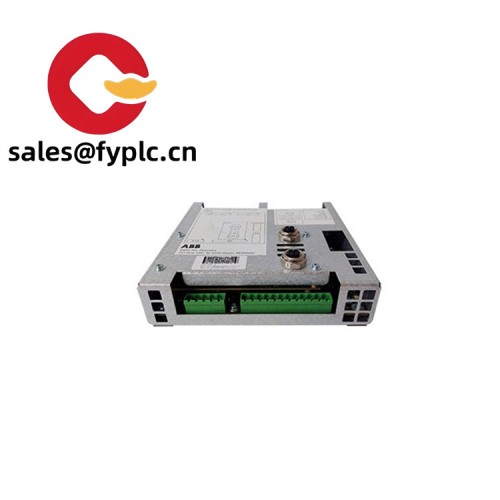
ABB RDIO-01 – I/O Expansion Module for ABB Drives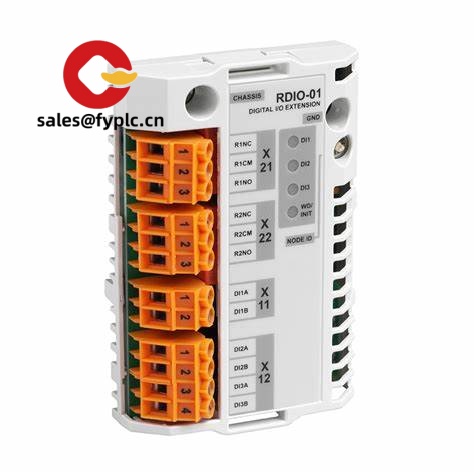
The ABB RDIO-01 is a plug-in I/O expansion module designed to add more control flexibility to ABB AC drives. From my experience, it’s most commonly used when a machine needs additional digital I/O and a couple of analog channels without moving to a full external PLC rack. You might notice that the module integrates directly into the drive’s option slot, which keeps wiring short and typically improves noise immunity in industrial panels.
One thing I appreciate is how it lets you scale up standard drive control—interlocks, permissives, selector switches, feedback pots, or a 4–20 mA process signal—without taking more cabinet space than a standard option card. In many cases, OEMs also use RDIO-01 to separate safety-related hardwired signals from fieldbus control, which keeps commissioning straightforward.
Order Placement Process and Guarantees
- Warranty: 365 days
- Delivery: 1 week for in-stock items; no more than one month at the latest
- Payment: 50% advance payment; full payment before delivery
- Express options: FedEx, UPS, DHL
Key Features
- Drive-integrated I/O expansion: Adds extra digital and analog channels to ABB drives without external I/O racks.
- Standard industrial signal ranges: Typically supports 24 VDC digital I/O and selectable 0–10 V / 4–20 mA analog ranges, depending on drive firmware.
- Backplane powered: No separate power supply; the host drive provides power and diagnostics.
- Short wiring runs: Option-slot mounting reduces wiring complexity and noise pickup inside the cabinet.
- Parameterizable behavior: I/O functions map via the drive parameters for quick commissioning and change control.
- Robust in typical plant environments: Designed for industrial panels where ambient conditions vary and uptime matters.
Technical Specifications
| Brand / Model | ABB RDIO-01 |
| HS Code (reference) | 8537.10 (classification may vary by region) |
| Power Requirements | Supplied by the host drive backplane; no external supply required |
| Form Factor / Dimensions | Plug-in option card; occupies one I/O/option slot in compatible ABB drives |
| Operating Temperature | Typically -10 °C to +50 °C when installed in a ventilated drive cabinet |
| Signal Input/Output Types | 24 VDC digital I/O; analog 0–10 V and/or 4–20 mA (channel count and ranges depend on drive family) |
| Communication Interfaces | Local I/O only; configuration via the drive’s parameter interface (no separate fieldbus on this module) |
| Installation Method | Slide-in/plug-in to the designated option slot; field wiring to the drive’s I/O terminal base |
| Typical Compatibility | Commonly used with ABB industrial drives that support R-series option cards (e.g., ACS/ACSM families). Verify by drive type code and firmware. |
Related or Supporting Products
- ABB RPBA-01 (PROFIBUS DP adapter): For fieldbus control when you prefer networked I/O over hardwired signals.
- ABB RDNA-01 (DeviceNet adapter): An alternative if the plant standard is DeviceNet instead of local I/O expansion.
- ABB RCAN-01 (CANopen adapter): Useful for compact machines standardized on CANopen.
- ABB RETA-01 (Ethernet adapter): For EtherNet-based integration; typically used when SCADA/motion data needs to be routed over Ethernet.
- Compatible ABB drives (e.g., ACS/ACSM series): Ensure your drive has a free option slot and matching firmware for RDIO-01.
- Shielded I/O cabling and ferrules: Helps maintain signal integrity and neat wiring in dense panels.
Feedback from a packaging OEM: “RDIO-01 gave us the extra interlocks and an analog tension input we needed without redesigning the cabinet. Commissioning was as quick as mapping parameters in the drive.”
Installation & Maintenance
- Panel environment: Install in a clean, ventilated IEC/UL-rated cabinet. Keep ambient within the drive’s specified range; avoid high humidity/condensation.
- Wiring: Use 24 VDC logic for digital I/O. For analog signals, use shielded twisted pairs; land shields at a single point to reduce ground loops. Separate power and control wiring.
- Mounting: Power down the drive, insert RDIO-01 into the option slot until fully seated, then secure wiring to the drive terminal base per the manual.
- Parameter setup: Map each input/output function via the drive’s parameter menu; verify scaling for 0–10 V or 4–20 mA as applicable.
- Safety: Lockout/tagout before installation. Confirm commons and reference grounds to avoid damaging analog channels.
- Routine maintenance: Re-torque terminal screws periodically, check for oxidation on contacts, and review diagnostics during scheduled PMs. Firmware updates (on the host drive) may expand I/O mapping options.
- Troubleshooting tip: If an analog reading seems off, check source impedance and scaling; in many cases it’s a wiring reference issue rather than a module fault.
Quality & Certifications
- Certifications: CE, RoHS; UL recognition typically applies when installed in a certified drive system.
- Manufacturer warranty: Backed by a 365-day warranty from shipment date as stated above.
Note: Exact I/O counts and supported signal ranges can vary by drive family and firmware. If you share your drive type code, I can confirm slot compatibility and the available channel set before you order.



Reviews
There are no reviews yet.