

Description
BLACK BOX ACR1000A-R2 — DVI/USB KVM Extender over CATx for Remote Workstations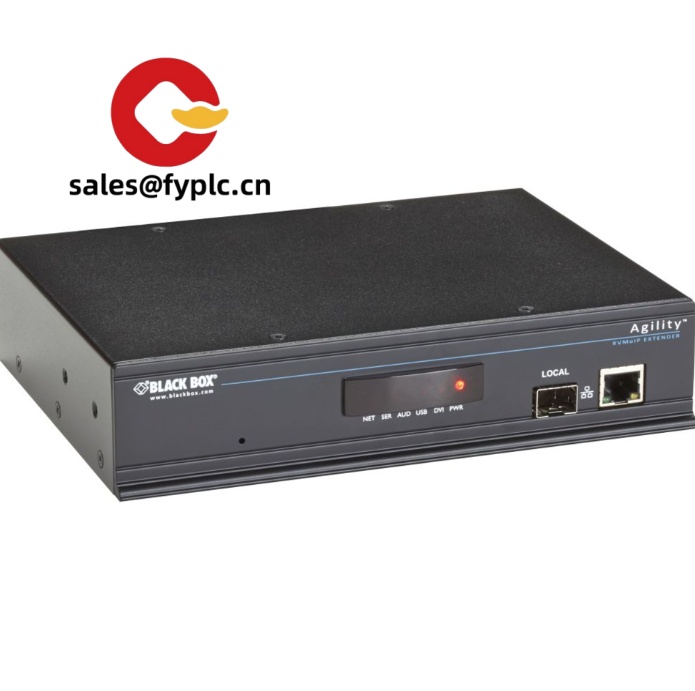
The BLACK BOX ACR1000A-R2 is a reliable DVI and USB KVM extender that typically bridges your workstation and PC/server over a single CATx cable. From my experience, it’s a solid fit when you need to relocate noisy computers to a secure IT room while keeping a crisp 1080p/1920×1200 desktop on the production floor, control room, or lab bench. You might notice that the design focuses on stability—clean video, responsive USB keyboard/mouse, and straightforward setup without driver headaches.
Company’s Order Placement Process and Guarantees
- Warranty: 365 days
- Delivery: 1 week if in stock; no more than one month at the latest
- Payment: 50% advance payment, full payment before delivery
- Express options: FedEx, UPS, DHL
Key Features
- DVI-D single-link video — Delivers full HD or 1920×1200 graphics for design consoles, HMI screens, and operator stations.
- USB HID for keyboard/mouse — Keeps input latency low; no special drivers needed in most cases.
- Audio and serial pass-through — 3.5 mm analog audio and RS-232 help with alerts, intercom, or device control when required.
- CATx copper cabling — Runs over standard CAT5e/6/6a infrastructure, which typically simplifies installation and spares.
- EDID handling — Stable monitor identification reduces random resolution changes after reboots or hot-swaps.
- Local/remote flexibility — A practical choice when PCs must sit in a secure rack while users work at a quiet, clean desk area.
- Compact metal enclosures — Small footprint units mount on a shelf or tuck into a cabinet without crowding airflow paths.
Technical Specifications
| Brand / Model | BLACK BOX ACR1000A-R2 |
| HS Code | 8517.62.00 (data transmission apparatus) |
| Power Requirements | External AC adapter, 100–240 VAC input; DC output per included supply (typically 5 VDC) |
| Operating Temperature | Typically 0 to 40 °C (non-condensing) |
| Video Performance | Up to 1920×1200 @ 60 Hz (1080p-class), DVI-D single-link |
| Signal I/O Types | DVI-D video; USB HID (keyboard/mouse); 3.5 mm audio; RS-232; RJ-45 CATx link between units |
| Communication Interfaces | Point-to-point over CAT5e/6/6a; EDID management for stable video sync |
| Installation Method | Desktop/shelf mounting; can be rack-shelved; wall-mount brackets used in many cases |
Application Fields
This extender typically shows up in control rooms, manufacturing lines, and test labs where PCs must be centralized. It’s also common in broadcasting suites and security monitoring, where operators need quiet desks and consistent video from equipment rooms down the hall or on another floor.
- Industrial HMI/SCADA workstations placed away from dust, heat, and vibration
- Control centers that need reliable, low-latency keyboard/mouse and sharp DVI displays
- Laboratories and QA benches where equipment noise and emissions are isolated
- Broadcast and post-production desks consolidating CPUs in a central rack
- Corporate IT or secure facilities separating users from assets for compliance
Advantages & Value
- Reliability that reduces downtime — Stable EDID handling and simple point‑to‑point links tend to avoid intermittent video issues.
- Compatibility with existing cabling — CAT5e/6 runs are easy to source and replace, which helps maintenance teams and budgets.
- Lower noise and better security — PCs stay in a locked rack; operators enjoy a quiet desk without fans or heat.
- Straightforward deployment — No drivers in most cases; just connect DVI, USB, audio/serial, and the CATx link.
- Supportable lifecycle — From my experience, standardized extenders like this make spares management and training easier.
Installation & Maintenance
- Environment — Mount in a ventilated cabinet or open shelf, 0–40 °C, non‑condensing humidity. Avoid direct heat sources.
- Cabling — Use solid‑core CAT5e/6/6a for the extender link; keep total channel length within the recommended run (short, direct patching performs best).
- Grounding & ESD — Ensure proper grounding; connect and disconnect with power removed to protect ports.
- Video setup — Set the target resolution (e.g., 1920×1200 @ 60 Hz). EDID usually locks it in after the first sync.
- Routine checks — Periodically dust vents, verify cable strain relief, and confirm firmware revision if updates are provided.
Quality & Certifications
- CE and FCC (Class A) compliant in most deployments
- RoHS-conforming build; power adapter safety approvals commonly include UL/cUL
- Backed by our 365-day warranty; extended service options available on request
Customer feedback (manufacturing site): “We moved three operator PCs into a secure rack and ran the ACR1000A-R2 links over existing CAT6. Video looks clean at 1080p, and our maintenance team likes that nothing changed at the desk except the small receiver box.”



Reviews
There are no reviews yet.