
Description
Oriental Motor NETC01-M2 – Network Converter for MECHATROLINK‑II multi‑axis motion on RS‑485 drivers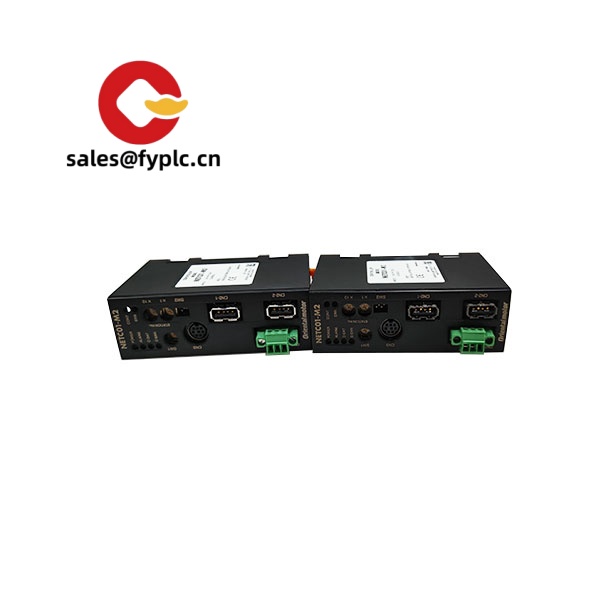
From my experience, the NETC01-M2 is a practical way to bring Oriental Motor AZ Series and BLV Series R drivers into a MECHATROLINK‑II environment without rewriting your control strategy. It acts as a protocol bridge: MECHATROLINK‑II on the controller side, and a multi‑drop RS‑485 link to multiple motor drivers on the device side. You might notice that it simplifies wiring quite a bit—one M‑II trunk in, one RS‑485 line out, and you’re coordinating several axes with consistent diagnostics.
Our Order Process & Guarantees
- Warranty period: 365 days
- Delivery time: 1 week if in stock; no more than one month at the latest
- Payment: 50% advance payment; full payment before delivery
- Express options: FedEx, UPS, DHL
Key Features
- MECHATROLINK‑II integration – Presents connected motors to your M‑II master as addresses/nodes, so multi‑axis coordination stays deterministic.
- Multi‑drop RS‑485 device side – Typically supports multiple AZ Series or BLV Series R drivers on one line, reducing cable runs and panel clutter.
- 24 VDC industrial power – Standard cabinet supply simplifies integration; power filtering is straightforward in most cases.
- DIN‑rail friendly – Compact module that usually snaps onto EN 60715 DIN rail, making retrofits painless.
- Status LEDs and straightforward addressing – Quick visual checks during commissioning; addressing via software or switches (varies by driver lineup).
- Deterministic command forwarding – Converts motion/parameter commands from M‑II to the Oriental Motor serial protocol with consistent timing.
- Good with mixed axis counts – In many cases you can scale from a couple of axes to well into double digits without re‑architecting the network layout.
Technical Specifications
| Brand / Model | Oriental Motor NETC01-M2 |
| HS Code | 8517.62 (Data communication apparatus) |
| Power Requirements | 24 VDC (typical industrial control supply) |
| Operating Temperature | 0 to +55°C (typical control cabinet conditions) |
| Signal I/O Types | MECHATROLINK‑II fieldbus (controller side) and RS‑485 multi‑drop (device side); no analog I/O |
| Communication Interfaces | MECHATROLINK‑II (10 Mbps class); RS‑485 to AZ / BLV Series drivers; status LEDs for link/activity |
| Installation Method | DIN rail mounting (EN 60715) or panel mounting, inside a ventilated control cabinet |
Where it tends to shine
- Retrofitting a MECHATROLINK‑II machine to run AZ Series stepper systems without changing the PLC or motion controller.
- Packaging and electronics assembly lines where several compact axes need synchronized, deterministic updates over a single fieldbus.
- OEMs standardizing on M‑II but wanting the energy‑saving or battery‑less absolute benefits of the AZ Series drivers.
One thing I appreciate is how it keeps commissioning predictable—address the nodes, check the LEDs, jog each axis, and you’re usually ready to tune motion profiles. A small packaging OEM told us they swapped to this converter to drop extra I/O cards and shaved a day off panel wiring on each build.
Related or Supporting Products
- Oriental Motor NETC01-ECT – EtherCAT version; ideal if your controller speaks EtherCAT instead of MECHATROLINK‑II.
- Oriental Motor NETC01-PN – PROFINET version; fits Siemens/PROFINET ecosystems.
- Oriental Motor NETC01-CCV2 – CC‑Link Ver.2 compatible; common in Mitsubishi‑centric lines.
- AZ Series Drivers (e.g., AZD-KD, AZD-KRD) – RS‑485 compatible stepper drivers for closed‑loop control and battery‑less absolute positioning.
- BLV Series R Drivers (BLV-R) – Compact brushless DC drivers frequently paired when higher speed is needed alongside AZ axes.
- RS‑485 Cables / Terminators – Twisted‑pair shielded cable and end‑of‑line resistors to stabilize longer multi‑drop runs.
Installation & Maintenance
- Cabinet & mounting – Install on DIN rail inside a metal cabinet (IP54+ recommended). Allow space for airflow; avoid mounting directly above heat sources.
- Wiring – Use shielded twisted‑pair for RS‑485 and maintain proper termination at the last device. Keep power and signal wiring separated to limit noise.
- Grounding – Bond cabinet ground; connect shields at the control‑side end. From my experience, this prevents intermittent M‑II errors at higher update rates.
- Addressing – Set device addresses before power‑up. If you mix AZ and BLV‑R drivers, document node order to keep commissioning tidy.
- Safety – De‑energize 24 VDC before changing connectors. Verify polarity; a reversed supply typically trips protection but can still cause downtime.
- Routine maintenance – Dust off vents quarterly, check RS‑485 terminations, and review event logs. Firmware updates, when available, should be applied during scheduled stops.
Quality & Certifications
- CE and RoHS compliant; UL recognition is typically available for the series.
- Manufacturer’s standard warranty applies; we support a 365‑day warranty window on supplied units.
- Built for industrial EMC environments; shielded cabling practices are recommended to meet emissions/immunity targets.
If you’re weighing protocol options (MECHATROLINK‑II vs EtherCAT/PROFINET), it usually comes down to your controller and existing plant network—happy to help compare update times, node counts, and cabling for your layout.



Reviews
There are no reviews yet.