
Description
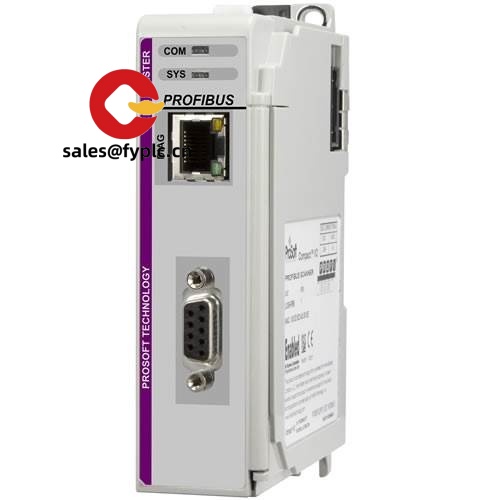
ProSoft ILX69-PBS – PROFIBUS DP Slave Module for CompactLogix (1769)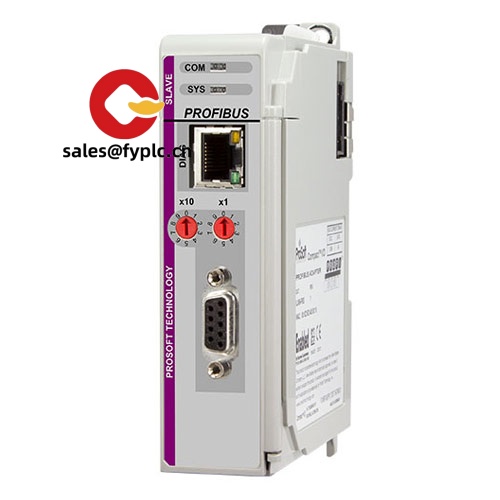
If you need your CompactLogix controller to talk reliably to existing PROFIBUS DP equipment, the ProSoft ILX69-PBS is a straightforward way to do it. It slots directly into the 1769 backplane and makes the controller appear as a PROFIBUS DP-V0 slave to a master on the bus. From my experience, this setup is ideal when a plant is standardizing on CompactLogix, but still has PROFIBUS drives, remote I/O (like ET200), or legacy process skids that you can’t replace yet. You might notice that commissioning goes quicker than expected—the module supports standard GSD-based configuration and typically runs at any PROFIBUS baud rate up to 12 Mbps with auto-detection.
Company’s Order Placement Process and Guarantees
- Warranty: 365 days
- Delivery: In-stock items ship in 1 week; no more than one month at the latest
- Payment: 50% advance payment, full payment prior to delivery
- Express options: FedEx, UPS, DHL
Key Features
- CompactLogix 1769 in-chassis integration – Installs as a standard 1769 module; no external gateway or extra power supply typically required.
- PROFIBUS DP-V0 Slave – Presents the controller as a single DP slave to the master, suited for drives, remote I/O, and packaged skids.
- Cyclic data up to 244/244 bytes – Supports up to 244 bytes input and 244 bytes output process data, which covers most DP applications.
- Auto-baud 9.6 kbps to 12 Mbps – Adapts to typical PROFIBUS networks without manual baud configuration.
- GSD-based configuration – Standard GSD workflow helps speed up commissioning and matches typical maintenance practices.
- Studio 5000 friendly – Add-On Profile/AOI support is commonly used, making tag handling and diagnostics more intuitive in many cases.
- Industrial temperature rating – Designed for control cabinets; stable operation in typical plant environments.
Technical Specifications
| Brand / Model | ProSoft Technology / ILX69-PBS |
| HS Code | 8537.10 (Control panels & programmable controller equipment, ≤1000 V) |
| Platform Compatibility | Allen‑Bradley CompactLogix / 1769 backplane |
| Power Requirements | 5 VDC from 1769 backplane; typical current draw up to ~800 mA |
| Dimensions & Weight | Approx. 118 × 35 × 87 mm (H×W×D); ~0.3 kg (single‑wide 1769 form factor) |
| Operating Temperature | 0 to 60 °C; 5–95% RH, non‑condensing (typical for 1769 modules) |
| Signal I/O Types | Cyclic PROFIBUS DP process data; up to 244 bytes IN / 244 bytes OUT (DP‑V0). Mapping to discrete/analog depends on the DP master and slave configuration. |
| Communication Interfaces | 1 × PROFIBUS DP (DB9 female, RS‑485); 1769 backplane to controller; baud rates 9.6 kbps–12 Mbps (auto‑detect) |
| Installation Method | In-chassis 1769 slot, DIN-rail or panel with end caps (ECR/ECL); standard CompactLogix I/O mounting practice |
Related & Supporting Products
- ProSoft ILX69-PBM – PROFIBUS DP Master for CompactLogix. Choose this when your CompactLogix must be the master on the DP network rather than a slave.
- ProSoft PS69-DPS – Earlier-generation PROFIBUS DP Slave for 1769; ILX69-PBS is the modern option with improved Studio 5000 integration.
- Allen‑Bradley 1769-ECR / 1769-ECL – Right/Left end caps required for proper 1769 bus termination in DIN-rail installations.
- PROFIBUS DP connectors & cable – 9‑pin D‑sub connectors with integrated termination and standard DP cable rated to 12 Mbps help ensure reliable signal integrity.
- CompactLogix power supplies (e.g., 1769-PA2 / 1769-PB2) – Verify backplane current budget; the ILX69-PBS typically draws higher current than standard I/O modules.
Installation & Maintenance
- Cabinet & mounting – Install in an IP20 control cabinet on DIN rail (or panel) with proper 1769 end caps. Maintain vertical clearance for airflow; avoid hot zones near power supplies.
- Power & grounding – Check the backplane power budget; bond cabinet ground and shield PROFIBUS cable at one end as per site practice to minimize noise.
- PROFIBUS wiring – Use DP-rated cable; keep segment lengths within baud-specific limits; terminate the first and last node only. From my experience, using connectors with built-in termination avoids most startup issues.
- Addressing & configuration – Configure via the DP master using the ProSoft GSD file; map cyclic I/O to controller tags using the provided AOI/AOP in Studio 5000.
- Routine maintenance – Periodically inspect connectors, cable shields, and terminators; keep firmware and AOP files current; back up the project after any I/O mapping changes.
- Safety – De-energize before inserting/removing 1769 modules. Observe ESD handling to protect the backplane and communication circuitry.
Quality & Certifications
- Certifications – CE, UL/cUL (industrial control equipment), RoHS compliant
- Manufacturer Warranty – Typically 1 year; our sales warranty covers 365 days as stated above
- Field feedback – Users often remark that mixed-vendor lines (Siemens DP I/O with CompactLogix) stabilize quickly after correct termination and AOP updates.
One thing I appreciate is how predictable the startup is—once the GSD is loaded and the byte counts match, the DP master usually picks up the ILX69-PBS without fuss. If you’re migrating in phases, this module seems to be the least disruptive way to keep proven PROFIBUS assets online while moving control to CompactLogix.



Reviews
There are no reviews yet.