

Description
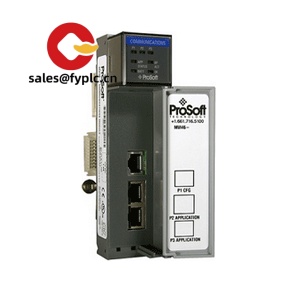
ProSoft MVI46-DFNT – EtherNet/IP Client/Server Communications for Allen‑Bradley SLC 500 (1746) Chassis
The Prosoft MVI46-DFNT gives an Allen‑Bradley SLC 500 system a clean, reliable path to EtherNet/IP devices. From my experience, it’s the straightforward way to bridge an older 1746 platform with modern drives, HMIs, and Logix controllers using CIP explicit messaging. You might notice that it behaves like a native slot module: data moves through M‑files, and the sample ladder makes mapping pretty painless in most cases.
Our Order Placement Process and Guarantees
- Warranty: 365 days
- Delivery: 1 week for in‑stock; no more than one month at the latest
- Payment: 50% advance payment, full payment before delivery
- Express options: FedEx, UPS, DHL
Key Features
- EtherNet/IP Client & Server – Supports CIP explicit messaging so an SLC can read/write data to Logix controllers, drives, and other EtherNet/IP devices.
- 1746 Backplane Integration – Installs as a standard SLC 500 slot module; data exchange via M0/M1 files for deterministic control strategies.
- Single RJ45 10/100Base‑T Port – Auto‑negotiation with typical switch gear; simple IP setup and diagnostics.
- Proven Ladder Sample – ProSoft typically provides a sample ladder routine that accelerates commissioning and reduces guesswork.
- Scalable Data Mapping – Flexible read/write definitions; in many cases you can add more devices without changing controller hardware.
- Industrial Build – Designed for typical SLC cabinet environments; CE/UL style compliance for plant acceptance.
Technical Specifications
| Brand / Model | ProSoft Technology MVI46-DFNT |
| Platform Compatibility | Allen‑Bradley SLC 500 series, 1746 chassis (single‑slot module) |
| HS Code (reference) | 8537.10 – Boards/assemblies for electric control (region‑dependent classification) |
| Power Requirements | Powered via 1746 backplane (5 VDC backplane supply) |
| Operating Temperature | 0 to 60°C (32 to 140°F), typical for SLC‑series modules |
| Communication Interfaces | 1 × 10/100Base‑T Ethernet (RJ45); EtherNet/IP explicit messaging client/server |
| Signal I/O Types | Communication module (no discrete/analog I/O) |
| Data Exchange Method | Backplane M0/M1 files; configuration via ProSoft tools and RSLogix 500 ladder |
| Installation Method | DIN‑mounted 1746 chassis slot; front‑access RJ45 |
| Certifications | CE, cULus; RoHS compliant (typical for this series) |
Where it fits well
Common use cases include connecting an SLC‑based panel to a modern EtherNet/IP VFD line, polling tags in a CompactLogix for recipe data, or exchanging diagnostics with an EtherNet/IP HMI that expects CIP objects. One thing I appreciate is how predictable it is when you stick to explicit messaging and keep the mapping tidy.
Customer feedback we hear a lot: “Drop‑in install, mapped a dozen drives without touching the SLC CPU firmware.” That seems to be the typical experience when the network is segmented properly and the IP plan is clear.
Related or Supporting Products
- ProSoft MVI46-MCM – Modbus (RTU/ASCII) Master/Slave for SLC 500; ideal when integrating serial Modbus devices instead of EtherNet/IP.
- ProSoft MVI69E-DFNT – EtherNet/IP Client/Server for CompactLogix (1769); a natural path if you’re migrating platforms.
- ProSoft PLX31-EIP-MBTCP – Standalone gateway bridging EtherNet/IP and Modbus TCP; useful when a chassis slot is not available.
- Allen‑Bradley 1746-Ax Chassis & 1746-Px Power Supplies – Required infrastructure for SLC 500 modules; size the chassis and PSU based on total module load.
Installation & Maintenance
- Cabinet & environment: Install in a 1746 chassis with adequate ventilation; typical control cabinet ambient 0–60°C, non‑condensing humidity.
- Wiring & network: Use industrial Cat5e/Cat6 to a managed switch; segment control traffic (VLANs) where possible to keep latency predictable.
- Configuration workflow: Define IP settings, build the DFNT read/write map in ProSoft’s configuration tools, and import the sample ladder into RSLogix 500 to handle M‑file buffering and status.
- Safety precautions: De‑energize the chassis before inserting/removing the module; follow ESD handling; verify power budget on the 1746 PSU.
- Routine maintenance: Back up configuration and ladder; periodically review message diagnostics; keep firmware and configuration files aligned after any plant network changes.
- Troubleshooting tip: If messages time out, check CIP path definitions and ARP table on the switch—small details that, in many cases, save hours.
Quality & Certifications
- CE and cULus listed; RoHS compliant (typical for ProSoft MVI46 series)
- Manufacturer’s warranty is typically 1 year; our coverage: 365‑day warranty from delivery
- Meets common EMC/industrial immunity requirements for control cabinets




Reviews
There are no reviews yet.